
You come home, arms full of groceries, and the hallway light turns on by itself while the thermostat adjusts the temperature. This scenario is not futuristic: it can be set up with three connected devices and half an hour of configuration. The real benefit of high-tech tips in daily life does not come from an isolated gadget, but from how we make them work together.
Cyber Resilience Act and connected devices: what changes for your purchases
Before talking gadgets, there is a regulatory constraint that most guides overlook. The Cyber Resilience Act (CRA), driven by the European Union, imposes cybersecurity from the design stage of connected devices. In practical terms, manufacturers must guarantee security updates throughout the expected lifespan of the product.
For us, buyers, this changes the game. A thermostat or a camera sold without a commitment to software support becomes a warning signal. The CRA pushes the market towards more durable devices, with a clear support cycle.
You can find regular analyses on these regulatory developments and their concrete impact on hardware choices at geeketteinside.fr. Before any purchase, checking the manufacturer’s update policy has become as relevant as comparing prices.
Generative AI in the connected home: beyond voice commands
Saying “turn on the living room light” to a voice assistant has been done for years. The real breakthrough in 2026 is that generative AI understands complex requests and chains multiple actions. You can say “I’m leaving for work in ten minutes, prepare the house” and get the heating turned off, the door locked, and the camera activated, all in one sentence.
The arrival in France of new assistants like Alexa+ illustrates this shift. These systems no longer just execute single commands. They manage life scenarios, anticipate certain needs based on your habits, and adjust settings without intervention.
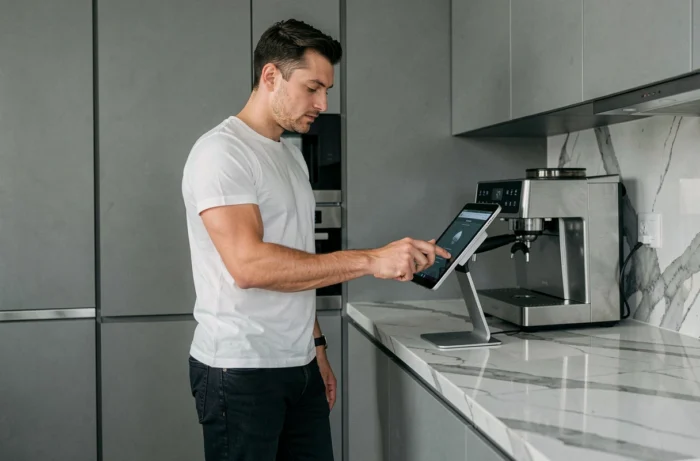
In practice, the most noticeable time savings are in energy management. An AI-driven thermostat learns your lifestyle and reduces consumption during your absences, without you having to program anything manually.
Field setup: where to start
The classic trap is wanting to connect everything at once. It is recommended to start with a single concrete need (heating, lighting, or security) and gradually add devices. Interoperability between brands remains variable, and feedback on this point varies depending on ecosystems (Google Home, Apple HomeKit, Amazon Alexa).
- Choose a primary ecosystem before buying any sensors to avoid incompatibilities
- Favor Matter-compatible devices, the protocol that unifies communication between connected objects from different brands
- Test each automation individually before creating chained scenarios, to avoid cascading bugs
Software tips to save time on smartphone and computer
The most cost-effective geekery in daily life costs nothing: it’s software optimization. We underestimate the time lost repeating the same micro-tasks on a smartphone or computer, while native shortcuts already exist.
Keyboard shortcuts eliminate dozens of clicks per day. On a workstation, mastering about fifteen combinations (copy, paste, switch windows, partial screenshot, session lock) significantly reduces digital fatigue.
Automating repetitive tasks without coding
On smartphones, automation apps allow you to trigger actions in sequence. For example: when connecting to the office Wi-Fi, the phone goes into silent mode, activates Bluetooth for the headset, and opens the professional messaging app.
- On Android, Tasker or Google Routines allow you to create these sequences in just a few minutes
- On iOS, Apple’s Shortcuts app offers similar automations, triggered by time, location, or network connection
- On computers, tools like AutoHotkey (Windows) or Keyboard Maestro (Mac) automate repetitive input and file management
The principle remains the same as for the connected home: identify a task you repeat more than three times a day and automate it. The time invested in setup pays off in just a few days.

Screen, video, and audio quality: choose according to actual use
We are pushed to buy the latest screen range or the most expensive microphone. In practice, the relevant choice depends on usage. For daily video conferencing, a moderately priced USB microphone with built-in noise cancellation yields better results than a poorly positioned studio microphone.
Good lighting improves video quality more than a new camera. Before investing in a 4K sensor, placing an adjustable temperature LED lamp facing you transforms the image perceived by interlocutors. This is the cheapest and most effective tip for professional calls.
On the screen side, the trend is towards low-consumption monitors with ambient light sensors. These models automatically adjust brightness and color temperature, reducing eye strain during long work sessions.
The useful reflex before any high-tech purchase remains to formulate the concrete problem you are trying to solve. A device that does not address an identified daily irritant ends up in a drawer, regardless of its technical specifications. The best gadgets are those we use without thinking, because they integrate into an existing routine rather than creating a new one.